Product tour
Follow the work from plan to handover.
Explore the parts of the process this workspace supports. Open a step to see the relevant product features and the records it produces.
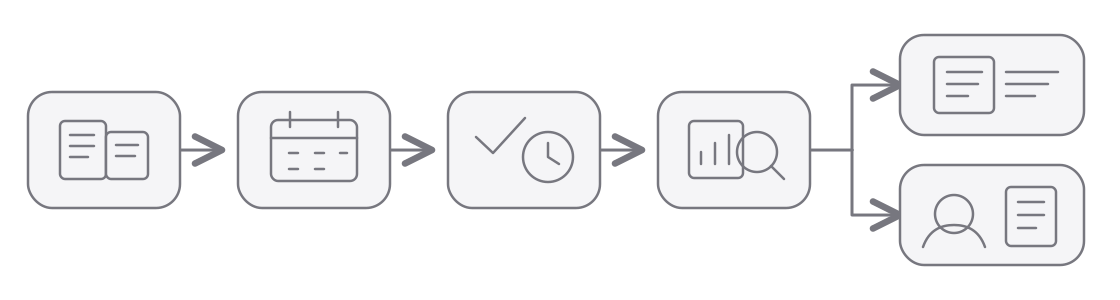
How information moves through the work
- Before the workPre-sales
Import customers and projects from your CRM when work is ready to start.
- 1 · PlanSet up the client work
Organise customers, projects and tasks; assign people and dates; plan capacity in the calendar.
- 2 · RunDo and record the work
Work from the task queue, update progress, record employee worktime and log project hours against tasks.
- 3 · ReviewCheck progress and time
Compare planned, worked and logged hours. Investigate gaps and check client project records.
- 4 · Hand overPrepare usable records
Send the right data to the next system:
- After the workInvoice clients and pay employees
Send invoice-ready project hours and payroll-ready worktime to your accounting and HR systems.
Configured integrations may help capture information during the work. Imports and exports connect your CRM, accounting and HR systems. Available options vary by setup.
Plan work people can act on
Keep progress and time close to the work
Dashboard
Start from the work that needs attention and see recent activity.
Worktime
Record the employee's overall working day, including breaks, independently of project hours.
Project hourlogs
Record time against projects and tasks so effort can be reviewed by client and job.
Find the gaps while they are still easy to resolve
Put planned working time, actual worktime and logged project hours side by side. Follow project progress, and give financial admins a real-time financial overview at organisation and project level.
Worktime and project hourlogs serve different purposes, so a difference is a prompt to review, not automatically an error.
Hand over the right data to the right system
Client invoicing
Prepare project and task hour records for the invoicing workflow. The invoice itself is created outside this workspace.
Employee payroll
Prepare employee worktime records for salary processing. Salary calculation and payment happen outside this workspace.
Connect with the tools around the work
Use available imports, exports and configured integrations to reduce duplicate entry. Integration and automation options vary by setup; ask the pilot team which connections are available for your workflow.
Explore settings, user roles and the mobile app direction.